How to redact a PDF in Chrome
A black rectangle drawn on a PDF can leave the text underneath it. Redact in the PDF editor of Eofent Capture burns the box into the page, so the text is really removed.
6 STEPS · CHROME AND EDGE
1Open the PDF
Open the PDF tab, press Open a PDF and pick the file.
2Choose Redact
You will find it with the quick tools on the left, or in All tools.
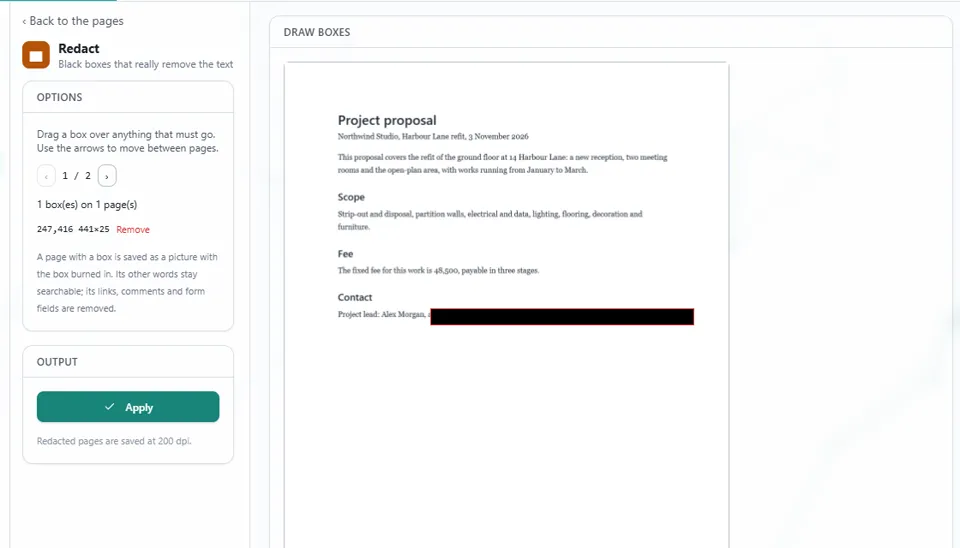
3Drag a box over anything that must go
The box appears in black straight away. Use the arrows to move between pages, and draw as many boxes as you need.
4Check the list of boxes
The panel counts your boxes, and Remove takes one away.
5Press Apply
A page with a box is saved as a picture with the box burned in.
GOOD TO KNOW
The other words on that page stay searchable. Its links, comments and form fields are removed. Redacted pages are saved at 200 dpi.
6Open Save, then Export
Press Export PDF, and the redacted file lands in your Downloads folder.
Install Eofent Capture
Eofent Capture is free to start; the free plan has daily allowances. SEE PLANS →