
Eofent Capture
Full-page screenshots, screen recording, PDF and text editors, and research notebooks with AI that cites your sources.
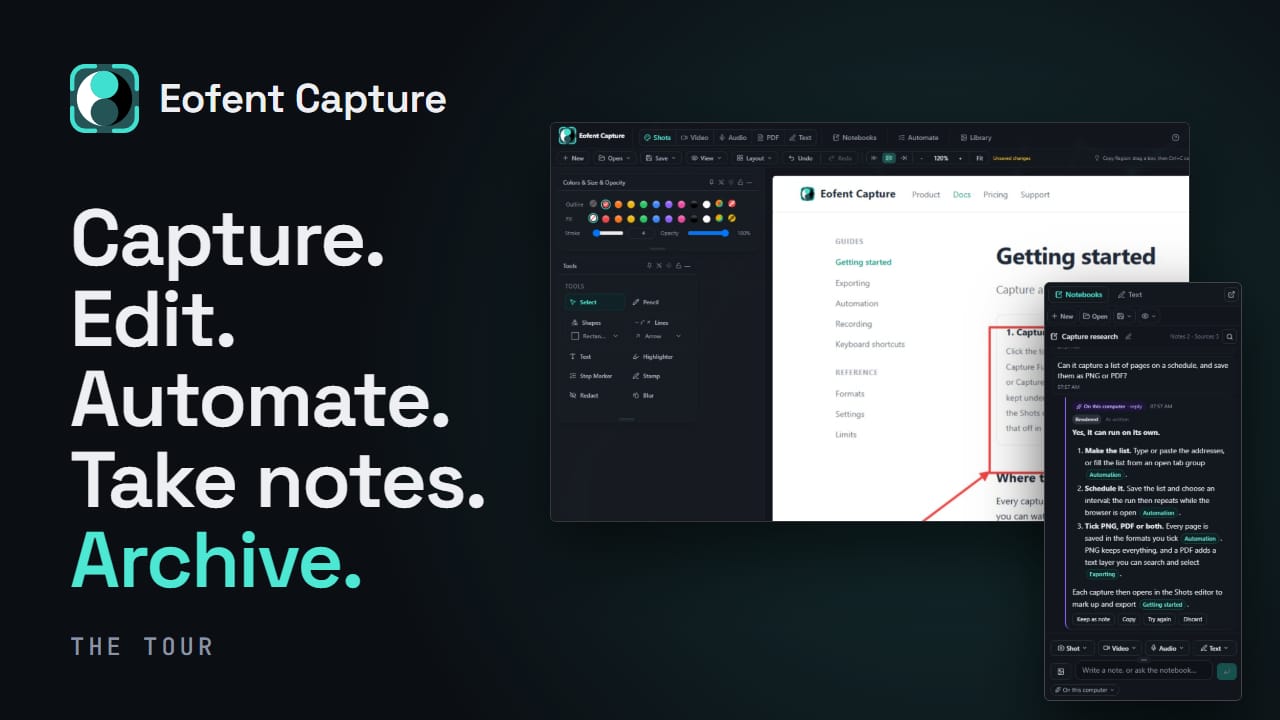
Capture a full page, a region, or what's on screen; mark it up with arrows, text, blur, redaction and crops; then export it as an image, a PDF whose text stays selectable, or an offline copy of the page. It also records your screen with tab audio, and can work through a list of pages in one run. Everything you capture is made and kept on your own computer.
Capture anything. Then use it.
Capture a whole page, a region or your screen; record a tab with its sound; collect what you read into a notebook beside the page and ask it questions with AI. Then finish the job in built-in PDF, text, image and video editors. Everything you capture is made and kept on your own computer.
How it works
Some tools like this send your page to a server, do the work there, and hand you a file back. Your work, your clients' pages, your internal dashboards, all through a machine you don't control.
Capture doesn't. Everything happens inside your browser.
Many shots, one file
What that means
Local by default
Your captures don't leave your computer unless you send them: to your own AI provider or your own Google Drive.
One window
Capture, edit and export in one place. No file to finish somewhere else.
Collect, then ask
One capture, start to finish
Three steps, one window. None of them touch the network.
- 01
Shoot
The page scrolls itself while sticky headers and pop-ups are held out of frame. Anything you would rather not photograph can be deleted first.
- 02
Annotate
It opens straight into the editor: arrows, text, pencil, redaction, lasso.
- 03
Export
Any image format, or a PDF that still behaves like a document. Several at once.
Marked up in place
What's in the box
What the extension does today.
- Capture
- Full page, region, or viewport. Long pages come back as one clean image, with sticky headers and pop-ups kept out of the shot. A PDF open in Chrome's viewer is captured page by page.
- Notebooks
- Collect as you read, beside the page. Open a notebook in the side panel beside any page and collect as you read: shots, recordings, clipped passages with their source, links and your own notes. Copy every source with its title, site and date, or download the notebook as a web page, PDF, Markdown, Word file, or a simple step-by-step guide.side panelclip selectionsourcesnoteshow-to guideWordMarkdown
- AI
- Answers that cite your sources. Ask a notebook a question and the answer cites the sources it used. Summarize, translate or ask about any source; rewrite, shorten, fix grammar or proofread your writing. AI is off until you choose a model: your browser's built-in AI, which runs on your computer where available, or your own key for a provider or a model server you run yourself.answers with sourcessummarizetranslaterewritebuilt-in AIyour own key
- PDF Editor
- Every PDF job, without uploading the file. Organize, merge, split, compress, crop and rotate pages. Sign, redact and annotate with highlights, notes and shapes any PDF reader shows. Make a scanned PDF searchable in eleven languages, on your own computer. Headers and footers with page numbers and Bates numbers, watermarks, PDF to images and pictures to PDF.mergesplitsignredactannotatemake searchableBates numberswatermarkcompress
- Text
- The page as words, with its source. Take a page, a selection or a drawn area as text, with a link back to its source, and work on it in the Text Editor: outline, find and replace, word count, tables and diagrams, side-by-side preview. Opens Word, Markdown, HTML and CSV files; downloads as Markdown, text, web page, PDF or Word.page to textoutlinefind and replaceword counttablesdiagramsWordMarkdown
- Edit page
- Tidy the page before you shoot it. Delete a cookie banner, hide a name, fix a typo, highlight the line that matters, add or remove a link, or zoom the whole page to fit. The site itself is untouched, the changes live in your tab and go when you reload.delete elementtype on the pagehighlightinsert imagelinkunlinkpage zoomtext from areaundo history
- PDFs that behave like documents. Search it, copy from it, click its links. Export as one long page or proper paper sizes.
- Editor
- A full annotation surface. Mark it up, then save the whole thing as a project and pick it up later, still editable. Image to Text reads the words out of any capture and places them as editable text, right where they were.pencilrectangleellipseshape presetsarrowtexthighlighterredactblurfree regioncroperaserstampsstamp brushstep markersframesfiltersimage to textundo history
- Record
- Screen, window, tab, or just the tab's audio. Records while you carry on working, or just a rectangle you drag on the page. Cut the result on a timeline with two tracks, then export it as video, or as a GIF at standard or high quality.
- Lists
- Capture a list of URLs while you do something else. Paste a list, pull it from your open tabs, or crawl a page and capture everything it links to. Walk away, and run the same one again next month, or put it on a schedule with Premium.
- Library
- Everything lands somewhere you can find it. Folders that file every kind of work, views grouped by website or date, saved projects, plus offline copies of whole pages you can reopen anytime. Save a file to your own Google Drive, or send it to your phone with a QR code.
- Yours
- Themes, language, and where files land. Whole colour palettes rather than a light/dark switch, and downloads that go where you say.
PDFs, edited here
Write it up
Record, then trim
Where the work happens
Your captures stay on your computer.
Capturing, editing, recording, text recognition and the PDF tools all run in your browser, and everything they make is kept there. Eofent never receives your captures. Anything that leaves your computer goes only where you send it: to the AI provider you chose, with your own key, or to your own Google Drive.
- Your captures
- Made and kept on your computer. Eofent never receives them.
- Text recognition
- Runs on your computer, eleven languages included.
- PDF and video
- Made on your machine.
- AI
- Off until you choose a model. Built-in AI stays on your computer; your own key talks to your provider.
- Google Drive
- Optional. Uploads only when you press Save to Drive or Send to phone, into your own Drive.
- Storage
- Your browser profile. Delete it and it's gone.
- Remote code
- None, ever.
- Account
- Only for your plan. The free tier works signed out.
A whole list at once
Pricing
Capturing, editing, recording and exporting are free, no watermark, no account needed. Premium removes the daily limits and adds scheduled captures, several windows at once and crawls from several start pages. Everything not listed here is free and uncapped, and daily limits reset at your local midnight. Every new account starts with 7 days of Premium, no card needed.
Where it's up to
Eofent Capture
Capture, notebooks with AI, PDF and text editors, recording and list runs, for Chrome and Microsoft Edge. Version 1.2.0.
Released
Chrome Web Store
Published, and the extension installs from there.
Live
Microsoft Edge Add-ons
Published, and the extension installs from there in Microsoft Edge.
Live