How to compare two PDFs in Chrome
Open the older version in the PDF editor of Eofent Capture, choose Compare PDFs and add the newer one. It shows which pages differ, marks the changes in red and lists the words that changed.
6 STEPS · CHROME AND EDGE
1Open the older PDF
Open the PDF tab, press Open a PDF and pick the file.
2Choose Compare PDFs
You will find it under Combine in the list on the left.
3Add the newer PDF
Press Add PDFs and pick the second file. The older one is A and the newer one is B.
4Read the summary
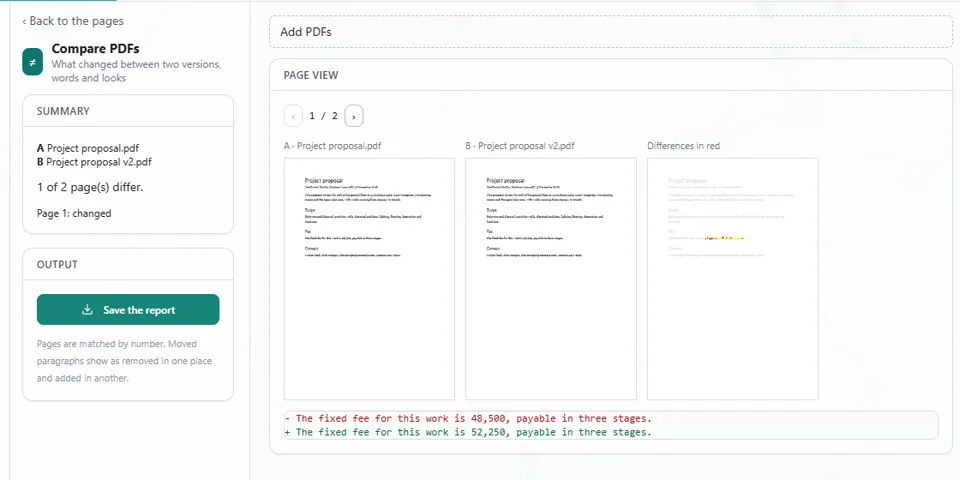
The panel says how many pages differ, and lists them.
GOOD TO KNOW
Pages are matched by number. Moved paragraphs show as removed in one place and added in another.
5See what changed
Page view shows A, B and the differences in red side by side, with the changed text underneath. Use the arrows to move between pages.
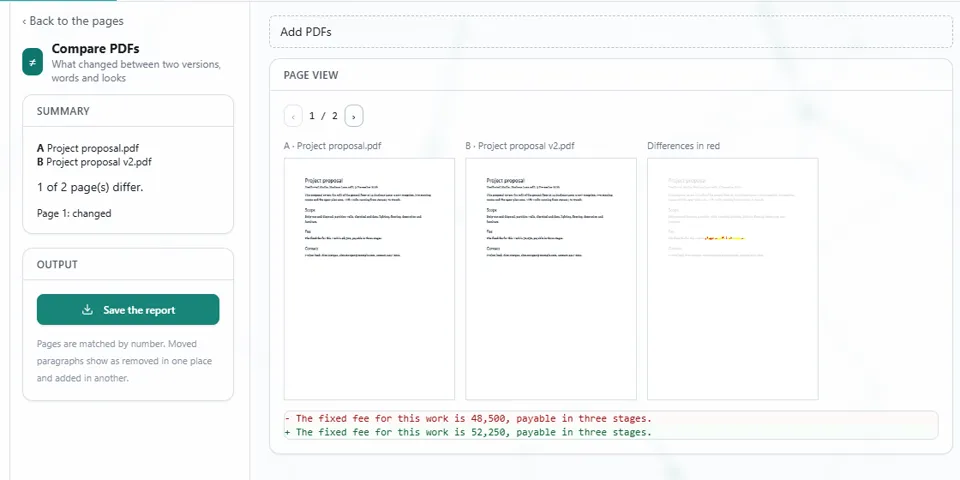
6Press Save the report
The report lands in your Downloads folder, to keep or to send to someone.
Install Eofent Capture
Eofent Capture is free to start; the free plan has daily allowances. SEE PLANS →